Lead Enricher Next to LinkedIn Premium and Sales Navigator
LinkedIn sells reach and search. We hand you a lead that's ready to contact. Here's where the two overlap and where they don't.

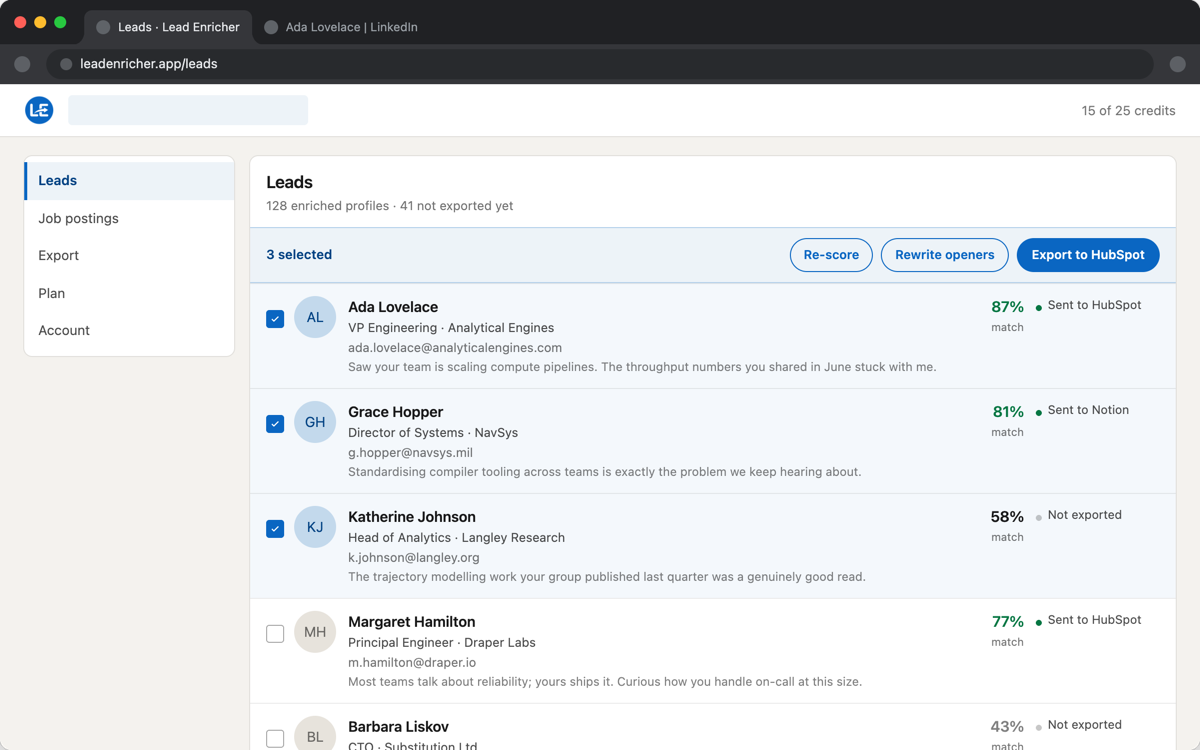
LinkedIn Premium Business and Sales Navigator are search and reach products: more profile views, saved searches, lead lists, and InMail credits to message people outside your network. They're genuinely useful for finding the right people. What they don't do is hand you anything to act on once you've found someone — no work email, no opening line, no sense of whether this person actually fits the role you're hiring for or the deal you're working.
Where they don't overlap
Sales Navigator will tell you a person exists and matches your filters. It won't find a work email for them — you still need a separate tool or a guess. It won't write a first message grounded in what they've actually done, beyond LinkedIn's own generic InMail templates. And it has no concept of a job posting to score a candidate against. Lead Enricher sits one step later in the process: it assumes you already found the profile, and turns it into an email, an icebreaker, and (if you're hiring) a match score, in one click.
Where they're complementary, not competing
In practice, the two stack well: Sales Navigator's search and saved lists for finding who to look at, Lead Enricher for turning each profile you open into a contactable, exportable lead. Replacing an InMail credit with an email you can follow up on outside LinkedIn is useful on its own, independent of which search tool found the profile in the first place.
Data stays yours
Enriched leads export to CSV, a webhook, Notion, HubSpot, or Google Sheets, with the fields and names you choose — nothing sits locked inside a LinkedIn saved-lead list.